


Music Audio Editor, MP3 Cutter
4.518.12K Reviews
App Specs
- Version
- 2.8.4.2
- Updated On
- License
- Free
- Downloads
- 50,000,000+
- Developer
- Video Screen Recorder, Voice Audio Editor, Cut MP3
- Categories
- Music & Audio
- Platform
- Android, iOS
Screenshots
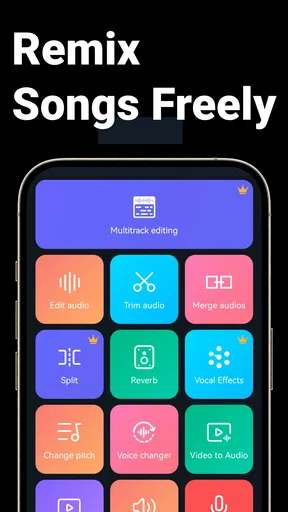
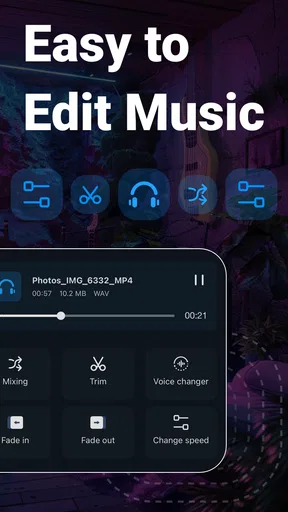
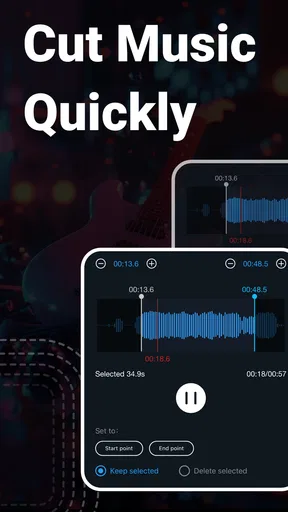
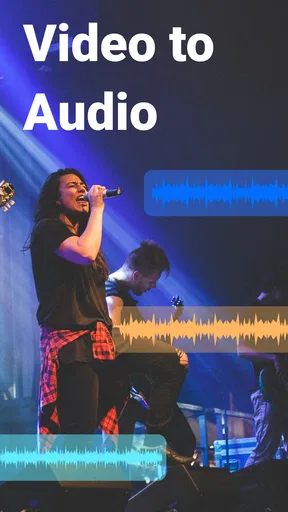
 Analysis by AppCompare
I reach for Music Audio Editor, MP3 Cutter when I want to make a quick, practical change to an audio file on my phone rather than open a full desktop workstation. It is a music and audio app from Video Screen Recorder, Voice Audio Editor, Cut MP3, and its appeal is the mix of trimming, basic sound adjustments, and track combining in one place. I find that useful for everyday jobs: preparing a ringtone, shortening a recording, or making a rough audio sketch without moving between several apps.
First Impressions
When I first opened the app, I was greeted with a clean and intuitive interface. You know how some apps just bombard you with too many options right off the bat? Not this one. It’s smooth and user-friendly. The main screen has a straightforward layout with options to either edit an existing audio file or create something entirely new. A quick tap and you’re ready to dive into the world of audio editing.
Features That Stand Out
Let’s talk features. This app has a bunch of them, but I’ll focus on a few that really caught my eye. First up, the MP3 Cutter feature. It’s perfect for those moments when you hear a killer beat and think, “This would make an awesome ringtone!” You can effortlessly cut and trim audio files to your desired length. Plus, the zoom-in feature makes it super easy to pinpoint exactly where you want to make your cuts.
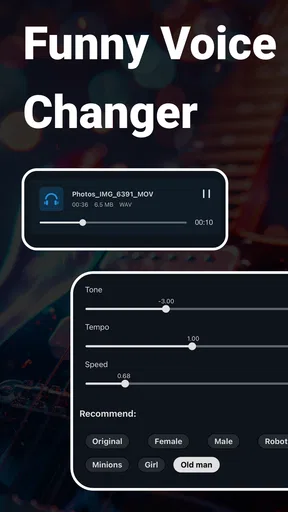
Next, there’s a whole suite of editing tools that let you modify audio speed, pitch, and volume. Ever wanted to make a chipmunk version of your favorite song? Or slow down a track to catch every lyric? You can do all that and more. It’s a playground for creativity.
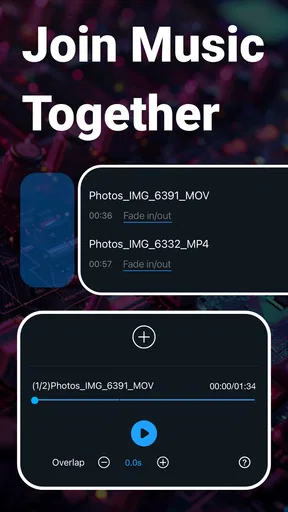
Oh, and let’s not forget about the audio merger feature. Combining multiple tracks into a single seamless audio file is a breeze. Whether you’re mixing songs for a party playlist or creating a mashup, this app has got you covered.
Performance and Usability
Now, I know what you’re thinking: “Does it lag?” Nope, not at all! The app runs smoothly without any noticeable delays, even when handling larger files. It’s optimized for both Android and iOS, so you’re good to go regardless of your device.
The developers have also done a great job ensuring that the app is lightweight. It doesn’t hog your phone’s resources, which means you can continue browsing social media or texting while your audio edits export in the background.
Worth Reading Before You Choose

Baby Panda World Brings Quick Play to Modern Phones, but Its Game Library Feels Busy

ESPN’s Live Game View Makes Following Close Games Easier

QuizzLand Review: A Good Fit for Short Trivia Breaks, Not Every Player

Basketball Stars: Multiplayer Is Fast, but Can It Recover When Matches Go Wrong?

WEBTOON Turns Phone Updates Into a Better Reading Routine

Link to Windows Runs on Shared Habits, Not Social Feeds
Who Is This App For?
This app is a hit among music enthusiasts, podcasters, and anyone who loves personalizing their audio experience. It’s also beginner-friendly, so if you’re new to audio editing, there’s a minimal learning curve. The tutorials and tips available within the app are helpful if you ever get stuck.
For the pros out there, the app offers enough advanced features to keep you engaged. The ability to export in various formats is a nice touch, allowing you to choose the best quality for your needs.
Making a Clean Edit Without Losing the Original
For a short ringtone or alert, I’d start by choosing a source file I already have permission to use, then make a separate trimmed copy rather than treating the edit as a replacement for the original. That simple habit matters on a phone, where a quick experiment with pitch or speed can leave you unsure which version is which. A descriptive file name makes it easier to find the finished clip later, especially if I have tried several cuts.
The zoomed waveform is most helpful when I use it to refine a broad selection, not as a promise that every cut will sound seamless. I first locate the phrase or beat I want, then listen to the beginning and end of the selection before exporting. If a cut feels abrupt, shifting it to a quieter moment or a natural pause can sound better than trying to make a very short clip. This is a practical distinction: precise visual trimming helps, but listening remains the final check.
For speech, I use a different approach from music. I leave a little breathing room around the words instead of cutting right up against the first consonant or last syllable. That avoids a clip that feels clipped or hurried when played back. For a ringtone, by contrast, a decisive start can work well because the aim is to hear the hook quickly. The same editing tools can serve both jobs, but the right cut depends on how the file will actually be heard.
Settings and Small Habits That Save Time
Before I begin a longer edit, I check what file I have selected and where I intend to save the result. This sounds obvious, but it prevents a common phone-editing nuisance: finishing a clip and then having to search through a crowded collection to identify it. I also listen once at normal speed before changing playback speed or pitch. Those adjustments can help me inspect a musical passage or make a playful variation, but they can also make it harder to judge the source accurately while I am editing.
Volume changes deserve a similar check. I treat them as a way to shape a particular clip for its intended use, not as a substitute for careful recording or professional loudness mastering. If I am preparing a voice note for someone to hear in a noisy place, I compare the edited version with the original at a comfortable listening level. If the result sounds harsh or distorted, more volume is not the answer; I go back to the source and make a gentler adjustment.
I also avoid stacking transformations casually. A speed change followed by a pitch change can produce a very different character from either adjustment alone, which may be fun for a comic sound but less suitable for a natural-sounding spoken recording. My repeatable routine is to make one change, preview it, and then decide whether another is needed. It takes a little discipline, but it makes the result easier to control and helps me remember what actually improved it.
Where It Fits Beside Other Audio Tools
Compared with a dedicated ringtone maker, this app is more useful when I want to do something beyond selecting a snippet: I can also adjust sound or join tracks in the same editing session. Compared with a full desktop audio workstation, it is easier to pick up for a small task, but I would not choose a phone editor as my main environment for detailed multitrack production, fine mixing, or a polished release. The distinction is less about which app is universally better and more about whether I need a quick edit or a serious production workflow.
It also fills a different role from a voice recorder. A recorder is the better starting point when the main job is capturing a new conversation, interview, or idea. This editor is more relevant after I already have audio and want to trim, reshape, or combine it. For podcast work, I see it as a handy companion for a short intro, a clipped excerpt, or a quick cleanup task, not a complete substitute for a setup built around recording, arranging, and reviewing a whole episode.
A realistic use for me would be cutting a short section from a music file for a personal alert, checking the start and finish with headphones, and saving the result under a clear name so I can locate it when setting up the sound on my device. Another day, I might join two short audio pieces into one file for a simple demonstration. Those are jobs where the all-in-one approach saves friction. If I needed tightly synchronized layers, detailed fades across many tracks, or reliable mastering control, I would move to a more specialized tool instead.
Who Will Appreciate It—and Who May Want More
I think the strongest match is someone who edits occasionally and values having several familiar tools close together. Beginners can start with a straightforward trim, listen back, and gradually try speed, pitch, volume, and merging. A creator who regularly makes short clips for personal projects may also appreciate being able to handle a small edit without transferring files to a computer first. The app is free to download, is rated for Everyone, and has optional in-app purchases; its broad adoption is reflected in an average rating of 4.6 from around 1.4 million ratings and over 50 million installs.
On the other hand, I would steer a serious musician toward a desktop digital audio workstation for detailed arrangement and repeatable studio work. Someone who only wants a one-tap ringtone crop may find a narrower cutter simpler. And if all I need is to record a memo, a recorder designed primarily for capture is a more direct choice. This app makes most sense when I expect to switch among a few editing tasks, rather than when I want the deepest control in one specialized area.
There is also a difference between a feature being present and a workflow being effortless for every project. Combining tracks is convenient for a simple mashup or joined clip, but I would listen through the whole result rather than assume the join will suit every transition. A change in tempo, loudness, or musical key can make adjacent sections feel mismatched. The app is useful for trying ideas quickly; careful listening and sensible source selection still determine whether the final file feels coherent.
Performance, Compatibility, and Practical Expectations
Now, I know what you’re thinking: “Does it lag?” Nope, not at all! The app runs smoothly without any noticeable delays, even when handling larger files. It’s optimized for both Android and iOS, so you’re good to go regardless of your device.
The developers have also done a great job ensuring that the app is lightweight. It doesn’t hog your phone’s resources, which means you can continue browsing social media or texting while your audio edits export in the background.
On Android, the listed minimum operating system is 6.0, and the current version is 2.8.3.1. I would still make a habit of previewing an export before sharing it or setting it as an alert: playback on phone speakers can hide details that headphones reveal, and a clip that sounds fine in an editor may be too abrupt or too loud in its final context. The app’s wide audience and strong average rating are reassuring signs of broad appeal, but they do not remove the value of checking each result for yourself.
The optional purchases range from $0.99 to $19.99 per item, so I would try the basic workflow first and decide whether any paid option is relevant to how often I edit. If I only need occasional trims, there is no reason to commit to a purchase before seeing whether the app fits my routine. If I find myself using several tools regularly, I can weigh the added cost against the convenience rather than assuming every feature is necessary.
Wrapping It Up
In conclusion, Music Audio Editor, MP3 Cutter is a versatile and powerful tool that fits right in your pocket. Whether you’re crafting the perfect ringtone or mixing tracks for your next DJ set, this app makes the process fun and straightforward. It’s definitely worth a download if you’re into audio editing or just want to spice up your music library.
So, what are you waiting for? Give it a try and start making some noise!
A More Grounded Verdict for Regular Use
My recommendation comes with a clear boundary: I would use it for convenient, self-contained edits, not as the center of a professional audio pipeline. Its combination of cutting, sound changes, and merging gives it more range than a single-purpose cropper, while the phone-friendly approach makes small jobs approachable. The trade-off is that broad convenience is not the same as deep control. When a project depends on exact timing across many layers or a highly consistent final mix, a specialized workstation is the better tool.
For someone deciding whether to install it, the useful question is how often they handle audio and what they expect to do with it. If the answer is “sometimes, and mostly short edits,” the app offers a practical place to start. If the answer is “every day, with detailed production demands,” I would treat it as a handy side tool rather than the whole studio. That is the balance I appreciate: it can make common edits less of a chore without pretending that a phone editor replaces every other kind of audio software.
Pros
- Intuitive user interface for easy navigation.
- Supports a wide range of audio formats.
- Includes advanced editing tools.
- Allows batch processing of files.
- Offers seamless integration with cloud storage.
Cons
- Free version contains ads.
- Some features require in-app purchases.
- Limited export options in free version.
- Occasional lag with large files.
- No direct social media sharing option.
FAQs for Music Audio Editor, MP3 Cutter
What features does Music Audio Editor, MP3 Cutter offer?
Music Audio Editor, MP3 Cutter provides a comprehensive suite of tools for editing audio files. Users can trim, merge, and mix audio tracks, as well as apply various effects and filters. The app also supports multiple audio formats, ensuring flexibility and ease of use for both beginners and professionals.
Is the app user-friendly for beginners?
Yes, Music Audio Editor, MP3 Cutter is designed with an intuitive interface that caters to users of all skill levels. Beginners will find the simple drag-and-drop functionality easy to navigate, while more advanced users can delve into detailed editing features to refine their projects.
Does Music Audio Editor support different audio formats?
Absolutely, the app supports a wide range of audio formats including MP3, WAV, AAC, and more. This versatility allows users to work with their preferred file types without the need for additional conversion tools, streamlining the editing process significantly.
Are there any in-app purchases or subscriptions?
While the basic features of Music Audio Editor, MP3 Cutter are free, the app does offer in-app purchases for advanced features. These may include premium effects, high-definition exporting options, and ad-free experiences. Users can choose to upgrade based on their specific needs.
What are the common issues users face with the app?
Some users have reported occasional bugs, such as crashes or slow performance, especially when processing large files. However, regular updates are released to address these issues and improve stability. It's recommended to keep the app updated to benefit from the latest improvements.


